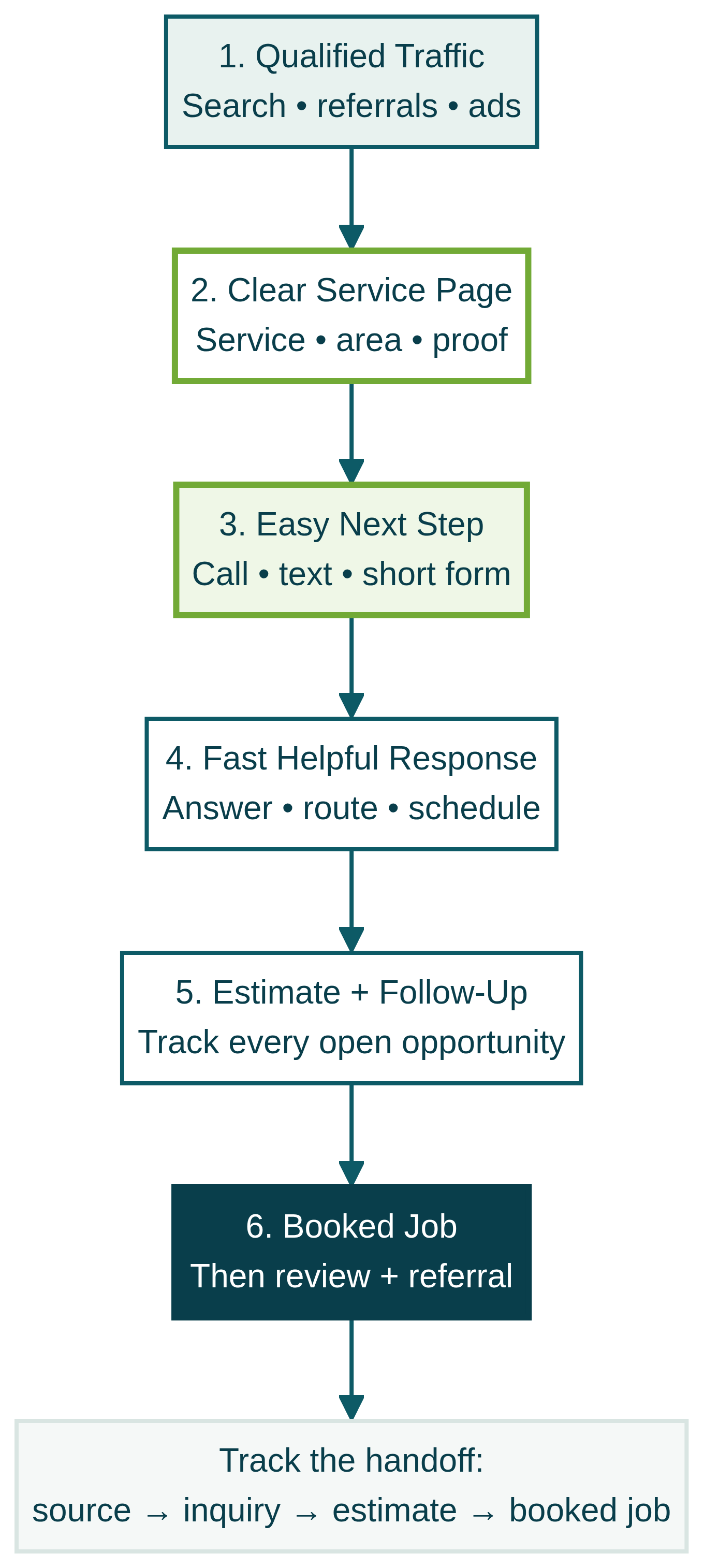
Website Gets Traffic But No Leads?
Website Gets Traffic but No Leads?

Ever wondered why your website gets a steady flow of visitors—yet your phone never rings, and your inbox stays empty? If you’ve invested time and money into digital marketing, attractive website design, maybe even some paid ads, but aren’t seeing real leads, you’re not alone. Many small business owners—plumbers, roofers, electricians, and local professionals—find themselves stuck with high website traffic but no leads. This guide will walk you through why this happens, and what you can fix today to start seeing actual results from all that effort.
Is Your Website Getting Traffic but No Leads? Understanding the Frustration
- Why it’s common for a website to receive visitors that don't become leads
- The disconnect between website traffic and real-world results
- Real examples from plumbing, roofing, and professional services
- Why your website might be ‘busy’ but your phone isn’t
Seeing high website traffic but no leads can feel like pouring water into a leaky bucket: all the effort, none of the payoff. It’s surprisingly common for small business owners to notice analytics spiking with visitors, but little to no form submissions or phone calls. This points to a disconnect—your business offers valuable services, yet users leave without contacting you. Often, this happens in local service businesses like HVAC, roofing, or law, where potential customers are searching with intent but aren’t convinced to take action on your site.
Imagine your local plumbing company’s site attracting dozens of daily visitors. The traffic looks impressive, but the calls just aren’t coming. Why? Perhaps there’s a lack of trust signals, or visitors can’t find a clear next step. Maybe the mobile experience is poor, or essential information is buried too deep. For service businesses, the website is more than a digital ad—it’s the beginning of your real-world relationship with new customers. If your phone isn’t ringing, it’s a sign to look beyond traffic numbers and focus on converting those visitors into inquiries.
What You'll Learn
- Why great design doesn’t guarantee leads
- Key conversion elements to check today
- How to build trust with your website visitors
- The role of mobile experience in leads
- Simple fixes before spending more on ads or SEO
- How tracking and quick replies boost conversion rate
Your Website: Brochure or Lead Generator?
Why Website Traffic Alone Isn't Enough
- Difference between a brochure site and a lead-generating asset
- The importance of lead generation for small business growth
- Common mistakes: focusing on looks over conversion
It’s easy to believe that more website traffic equals more business. In reality, just attracting visitors isn’t enough. A typical “brochure” site focuses on beautiful images and polished website design, but stops short of nudging a website visitor to take action. A lead-generating site, by contrast, is designed with a singular goal: generating leads. It guides visitors from their first click to a clear, specific next step—such as calling, booking, or requesting an estimate.
Small businesses often invest in flashy visuals, hoping they’ll translate into calls. But if the website lacks clear messaging, strong calls to action, or proof points like trust signals— those visitors will simply bounce. Case studies show that even a high traffic site with a high bounce rate and weak contact form won’t produce the lead generation results you need. Remember, your site’s job isn’t just to impress; it’s to start a conversation and build trust at every step.
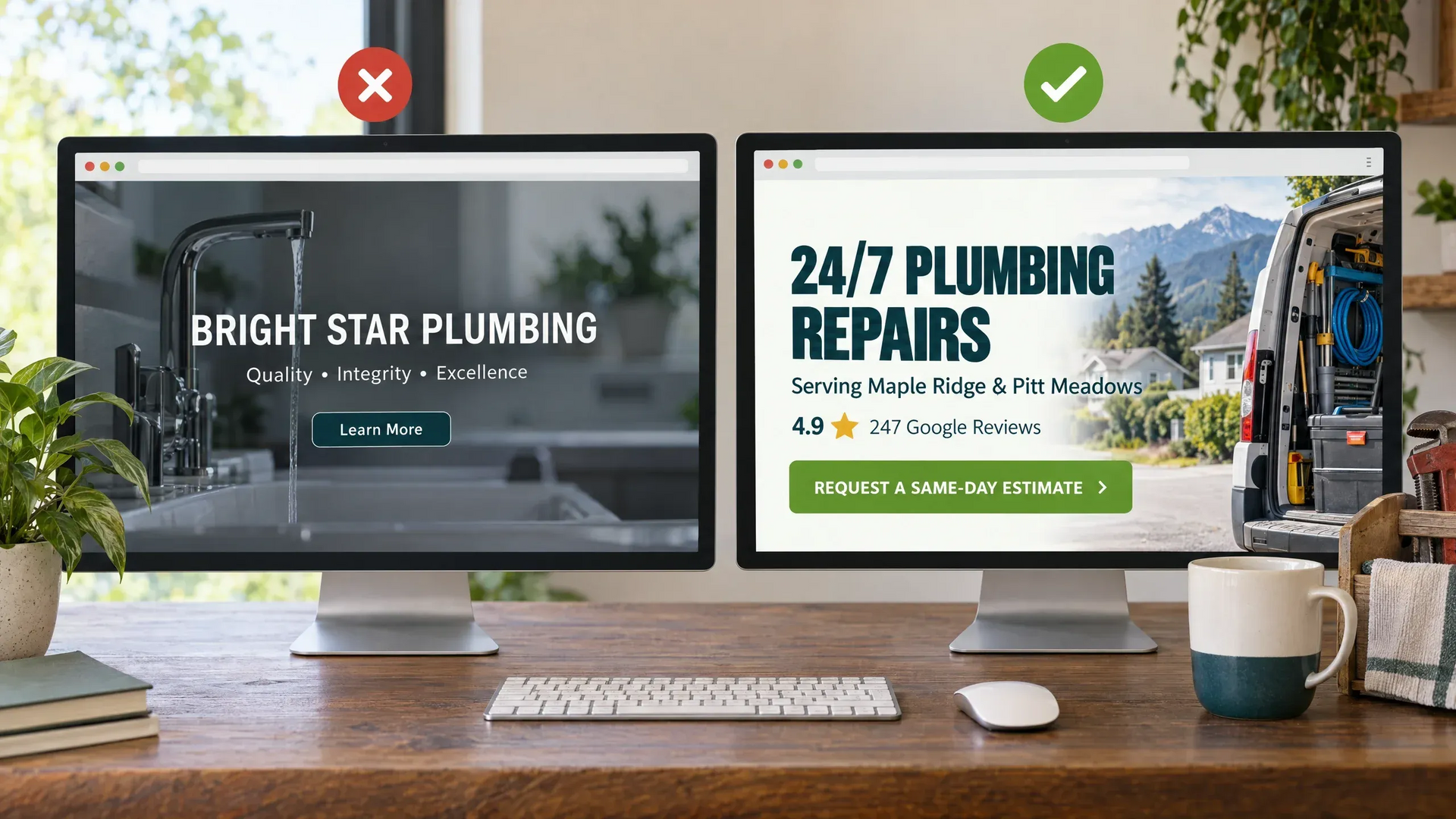
Why a Great Looking Website May Still Fail to Convert Website Traffic
Missing Trust Signals and Conversion Paths
- What trust signals does your website show?
- The role of calls to action, reviews, and licensing in lead generation
A visually impressive site can still fail if it doesn’t inspire confidence or offer a direct path to contact. Think about trust signals visitors notice: visible customer reviews, proof of certifications and licensing, awards, and a real, local address. These elements all help lower the bounce rate by showing your business is credible and safe to contact. If reviews are hidden, awards missing, or there’s no sign of being locally licensed, every new website visitor is more likely to leave without inquiry.
Nearly every high-converting service website includes multiple calls to action, 5-star reviews near their contact form, and specific trust signals. Clear privacy policy and transparent business details help, too. Too many small businesses lose out because their sites are designed for looks, not conversions—neglecting lead generation value.
How to Convert Website Visitors: Turning Website Gets Traffic but No Leads Into Results
Make Service, Area, and Customer Problem Clear Fast
- Use location, service headlines, and real language customers use
- Examples from HVAC, electrical, and legal services
Your ideal customer should know within seconds what you offer, where you work, and how you help. This isn’t just about SEO keywords—it’s about clarity. Use plain headlines that state your service (“Plumbing Repairs in Springfield” or “Bankruptcy Lawyer for Homeowners”) and reinforce what makes you different. Borrow phrases from your best reviews or listen to how customers describe their problems—then use that in your copy. For instance, an HVAC company might say, “Fast furnace repairs for Clark County homes—same day quotes, no surprise fees. ” A law office might open with, “Legal help for car accidents in Maplewell, with free first consultation and 24-hour hotline. ” When visitors immediately recognize you serve their area and offer exactly what they need, the odds of generating leads dramatically improve.
Calls to Action that Work for Service Businesses
- Make contact methods clear: call, text, form, booking
- Avoid confusing options or hidden buttons
- Short, clear forms for faster response
Too often, calls to action are hard to find, buried at the bottom, or lost among too many choices. Every high-converting service website makes the next step obvious. Put a single, clear button (“Call Now,” “Request Estimate,” or “Book Online”) where visitors scan first—both at the top and after key sections. Avoid giving five ways to contact unless you explain each. On mobile, prioritize click-to-call or fast text because most prospects want instant connection. Keep forms short—just enough for name, contact info, and an optional note. The more you ask, the fewer people will fill it out. Support form submissions with confirmation messages that explain when to expect a reply. And always make sure your website design supports easy navigation for all users, minimizing load time and improving user experience.
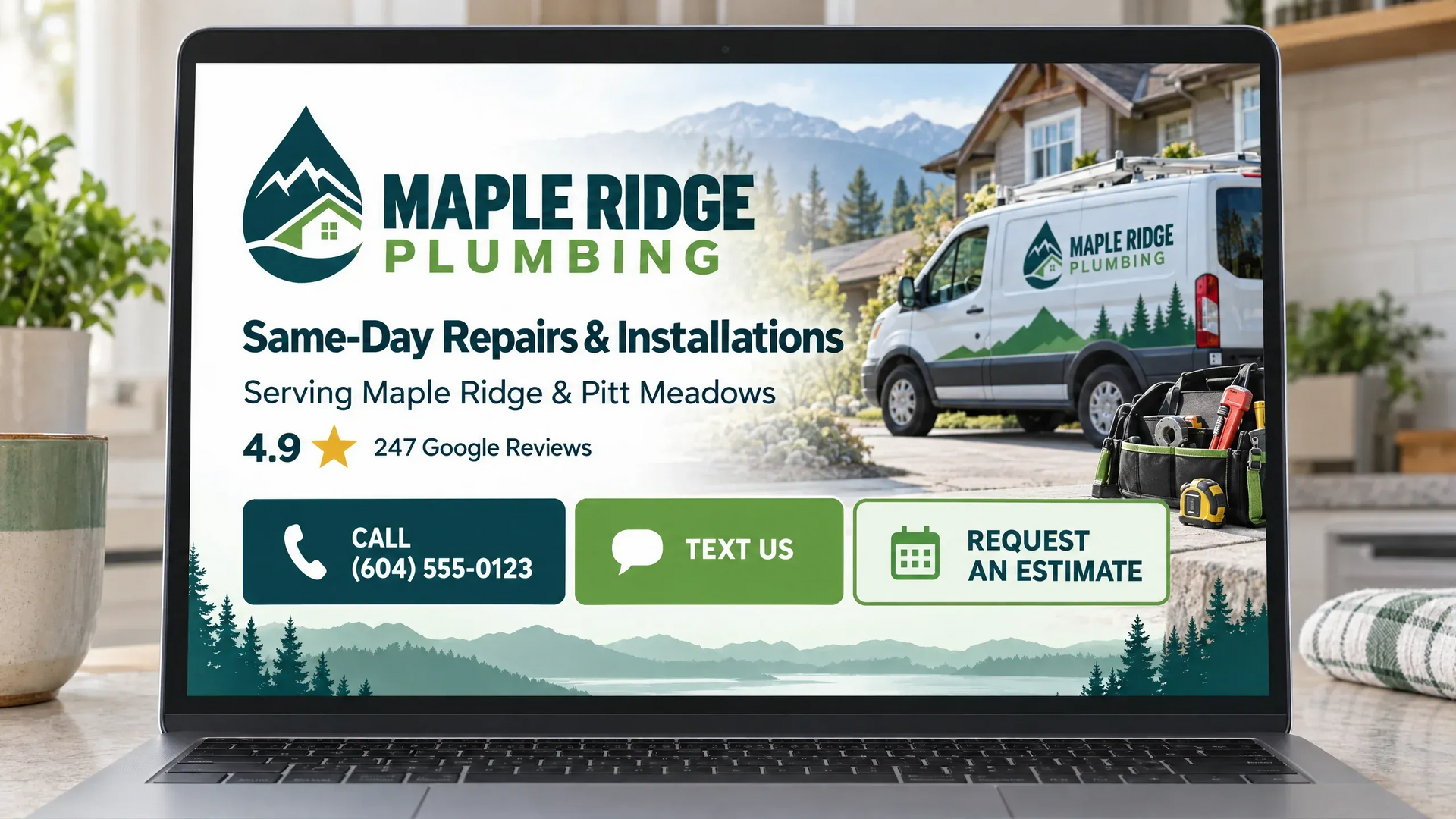
Add Trust Signals Where They Matter Most
- Where to add visible 5-star reviews and awards
- Project galleries or before-and-after images
- Relevant certifications, licensing, and service-area details
- Featuring specific quotes from happy customers
Trust signals should appear wherever visitors make decisions—next to contact forms, above service descriptions, and below booking buttons. Don’t bury reviews on a separate page; add a snippet of a customer’s kind words right where someone is deciding to click. If you’ve won awards, are fully licensed, or have unique certifications, showcase them visually. A strong project gallery or before-and-after images can outperform pages of generic claims. Paint a clear, confident picture using real results, specific proof, and consistent service-area details throughout the site.
"We saw a 40% increase in quote requests just by adding Google reviews to every service page." – Owner, Local Plumbing Business
If customers rave about your quick replies, clean job sites, or professional staff, quote those lines prominently. Case studies and specific testimonials demonstrate impact—far more effective than saying “We value quality and integrity. ” Place trust signals in sight when it’s time for the visitor to take action, not hidden several scrolls away.
Boost Mobile Experience and Accessibility
- Ensure click-to-call and short forms work on all devices
- Plain English service descriptions – no jargon
With most local searches happening on smartphones, your mobile experience is critical. Double-check that your contact buttons, forms, and calls to action are genuinely mobile-friendly. Can a website visitor call you in a single tap? Are forms short and clickable, with no zooming or scrolling required? A poor mobile layout is a major cause of traffic but no leads issues. Use simple, everyday language—skip the industry jargon and focus on what the customer cares about: fast response, honest work, clear pricing. For each service page, imagine you’re answering questions for a busy, skeptical neighbor. Accessibility and plain English messaging help you reach even more people.

Answer Questions Before Visitors Leave
- Address key service FAQs (pricing process, service area, timing)
- Make next steps and response times transparent
Visitors often click away when they don’t see an answer to their most basic questions: “Do you serve my zip code?”, “How quickly can I get a quote?”, “What happens after I submit my info?” Address these directly in your page content or FAQ section—and be specific. For example, “After you submit the form, a team member will call within 15 minutes to confirm your details and set up a visit. ” Honest timing and step-by-step clarity help ease concerns, reduce bounce rate, and turn curiosity into leads. Make your user experience as seamless and reassuring as possible.
Specifics Beat Generic Claims—Every Time
- Replace "quality, integrity, excellence" with proof and clear benefits
- Highlight real customer outcomes and metrics
Customers have grown immune to vague promises. Swap out claims like “top quality” or “trusted experts” for real evidence: before-and-after images, numbers from completed projects, or direct quotes from satisfied customers. Did a homeowner save money after your insulation job? Did your legal team resolve a case faster than expected? Share those details.
Metrics, photos, and testimonials cut through the noise and build instant credibility. The more specific your proof, the easier it is for prospects to trust you as their solution. Remember, every website visitor is looking for concrete reason to choose your business over a competitor—which is why details far outweigh empty statements.

Why the Lead Path Matters After a Call or Form
- Rapid response wins more jobs than slow replies
- How to follow up and nurture website leads
- Tracking conversion rate with CRM or simple tools
The conversion journey doesn’t stop when a form is submitted or the phone rings. Studies and real-world case studies show that prompt response is key: leads are most likely to convert within the first few minutes. Equip your team with a process—auto-replies, texting, or a dedicated call-back window. Even a simple CRM or spreadsheet to track inquiries and next steps can boost your conversion rate over time. Don’t rely on good luck for follow-up. Set up reminders to nurture prospects who aren’t ready on the first call. Tracking which sources and web pages drive the most inquiries lets you invest your marketing budget more effectively—raising your return from any future paid ads or digital marketing campaigns.
Can AI and Simple Tools Help Small Business Lead Generation?
- AI-powered chat, booking, and follow-up: realistic examples
- Cautions: AI must be customized to your business
- Benefits of documented response processes for small teams
New AI tools and chatbots can help small teams manage leads—even after hours. For example, an AI-powered chat can answer common questions, collect basic info, or start a booking. However, always customize any responses to fit your service, style, and customer expectations. Your process must escalate sensitive or complex queries to a real human. A well-documented response system, even with automation, ensures you deliver consistent, prompt communication every time your website gets traffic but no leads. In the end, tech is a support tool—not a magic fix. But smart processes can save time, reduce errors, and let your small business punch above its weight.
Website Conversion Check: A Simple Checklist
- Is your content truly connecting with your audience's emotions and thoughts?
- Does your homepage clearly state your service and location near the top?
- Do you have visible, specific calls to action on every key page?
- Are 5-star reviews and project examples easy to spot before contact?
- Is it effortless to call or message from both desktop and mobile?
- Do you answer “What happens next?” and set response expectations?
- Is every form short and simple enough for a busy user?
- Have you replaced vague claims with project details or proof?
- Do you track leads and follow up consistently?
- Are you testing and reviewing which pages really drive qualified inquiries?
Traffic Is Still Important—But It Needs a System Behind It
How Website Traffic, Qualified Leads, and Conversion Rate Work Together
- Why more ads or SEO are only part of the answer
- The value of connecting traffic, a landing page, response process, and follow-up
- Improving conversion gives you more from existing effort and ad spend
Website traffic is still vital—but only if your site and team are ready to capture opportunity. More paid ads or aggressive SEO campaigns may increase visitors, but if your landing page lacks clarity, trust, or an easy next step, you’ll see little return. It’s the combination—a well-structured page, strong calls to action, real trust signals, and quick follow-up—that turns traffic into real business results. Before investing in more social media, digital marketing, or ad spend, ensure you’re maximizing current traffic. Conversion improvements (sometimes called “CRO”—Conversion Rate Optimization) usually give better return than simply bringing in more eyeballs. It’s about turning a steady stream of visitors into steady business growth.
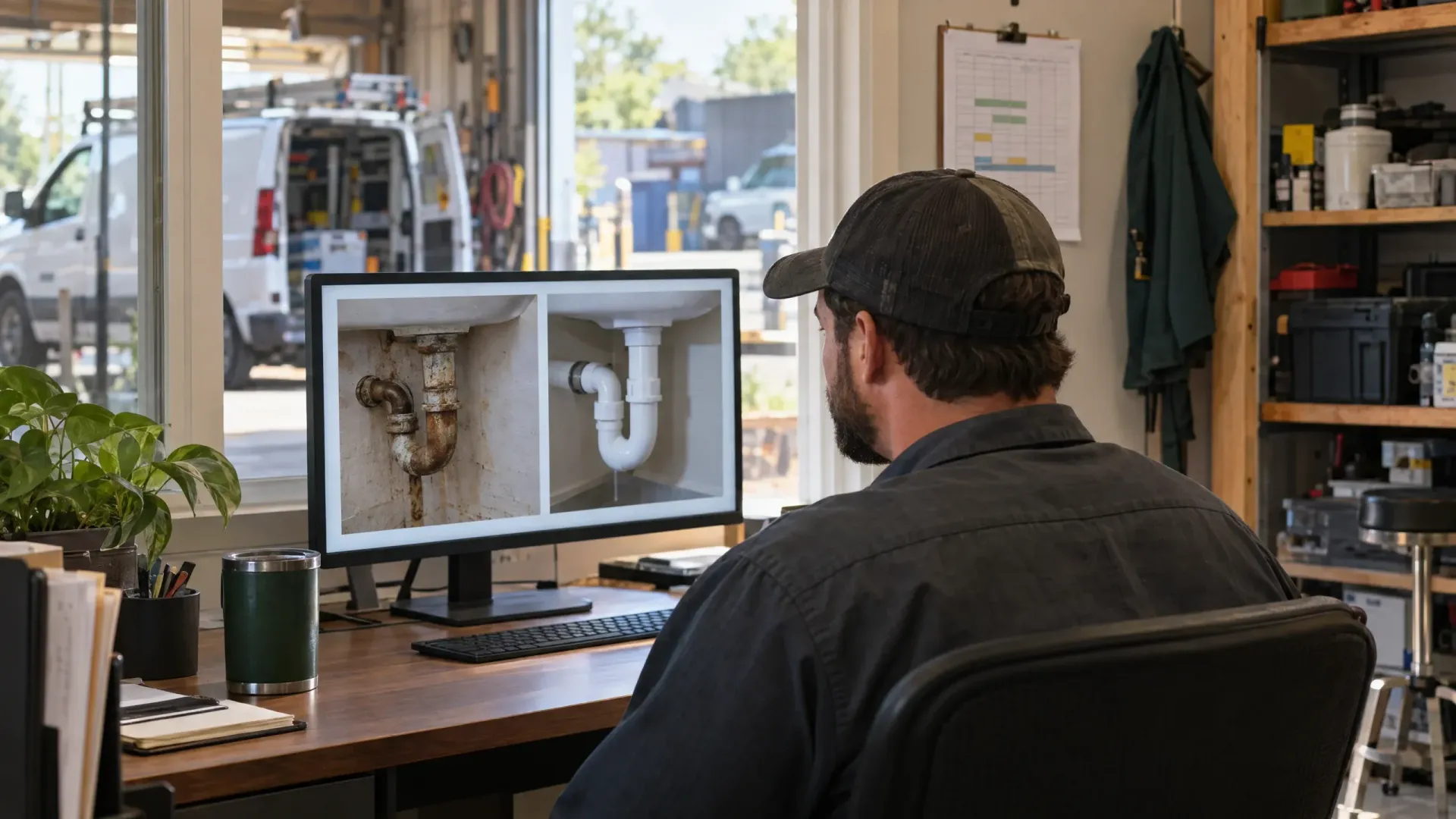
Quick Reference Table: Website Conversion Elements
| Conversion Element | Description | Why It Matters |
|---|---|---|
| Service + Area | Clear headline stating service and location | Reduces confusion, improves qualified leads |
| Call to Action | Singular, obvious next step | Drives action instead of indecision |
| Trust Signals | Visible reviews, licenses | Builds credibility at decision points |
| Contact Options | Click-to-call, short forms | Makes outreach effortless, especially on mobile |
| Answered FAQs | Service area, timing, process | Reduces visitor anxiety, encourages inquiries |
| Proof, Not Claims | Specific testimonials, project photos | Demonstrates real results |
| Timely Response | Fast reply after inquiry | Increases win rate vs. competitors |
| Lead Tracking | CRM, spreadsheets, or simple logs | Shows where to invest for more leads |
People Also Ask
Is AI killing website traffic?
- AI is changing how people search, but local service demand remains strong
- AI tools can help capture and respond to leads rather than reduce traffic
- Important to focus on qualified website traffic and conversion, not just raw numbers
AI isn’t “killing” local service website traffic. While search tools are evolving, your potential customers still need everything from plumbers to accountants. In fact, AI-powered chat can assist in converting visitors more efficiently. Rather than focusing solely on traffic numbers, shift your attention to qualified site visits and how you nurture leads from there.
Why am I getting clicks but no conversions?
- Possible causes: unclear service offer, weak trust signals, no clear call to action, or mobile issues
- Review checklists and fix conversion friction first
Clicks without conversions often point to confusion or friction. If visitors land on your website but don’t take action, look for issues with your service messaging, trust signals, or contact options. Ensure your website design is simple, quick to load, and answers key visitor questions. Often, even small changes—like clearer calls to action or better mobile options—move the needle on lead generation.
Why am I getting traffic but no sales?
- Sales result from nurturing leads after contact, not just web visits
- Fast response, honest answers, and strong follow-up help turn leads into sales
Traffic is just the first step. Converting website leads into sales depends on how quickly and professionally you follow up. Be transparent, provide direct answers, and track every inquiry’s journey. A strong post-inquiry process can make all the difference between “traffic but no leads” and steady business growth.
What is the 80/20 rule in SEO?
- Focus on the 20% of web pages, keywords, or lead paths generating 80% of desired results
- For most service businesses, a few high-value pages and lead flows drive most conversions
The 80/20 rule says that a small portion of your web pages—often just a few lead-optimized landing pages—generate the bulk of your conversions. Review your analytics and double down on optimizing the proven paths where potential customers engage and reach out.
FAQs: Website Gets Traffic but No Leads
Why does my website get visitors but no calls?
- Calls may be low if the service or next step is unclear, trust signals are missing, or it’s hard to call from mobile
Visitors sometimes won’t call if they can't tell quickly what your business offers, why they should trust you, or how to get in touch. Make sure your phone number is easy to find, trust signals are visible, and calling is click-to-call on mobile devices.
How can I get more leads from my service website?
- Improve calls to action, add trust signals, answer FAQs, and track inquiries for follow-up
Start by adding clearer calls to action, displaying real customer reviews, and answering common questions on each page. Track every form submission and phone inquiry so you never miss a follow-up opportunity.
Should I improve my website before spending more on Google Ads?
- Yes, increasing ads won’t help if visitors leave without inquiring—optimize your site and process first
Absolutely. More paid ads will just waste money if your current site is leaking leads. Always refine your core website, contact forms, and response process before ramping up your advertising spend.
Where should customer reviews appear on my website?
- Display key reviews near contact forms and service details, and add a reviews page for detailed testimonials
Feature a snippet or summary of reviews next to every call to action or contact option—not just on a “Reviews” page. This is where trust matters most and can persuade a hesitant website visitor to reach out.
Can AI help a small business respond to website leads faster?
- AI chat and autoresponders can help, as long as they’re set up with responses that fit your business and escalate to a human when needed
Yes. AI-powered chat and automated emails can speed up the first reply, but make sure they’re tailored for your services and escalate complex issues to a human team member at the right moment.
Key Takeaways
- Website gets traffic but no leads is a common challenge—especially for small businesses
- More traffic only helps when the website and lead path make contacting you easy and trustworthy
- Make your next step clear, build trust, and respond quickly to every inquiry
- Small site tweaks can deliver big conversion results for service businesses
Ready to See What Better Conversion Could Mean for Your Business?
- Use our free Five Moves tool to enter your normal business numbers and explore how improvements in leads, conversion, sales per customer, average sale, and margin could affect your results. Then click the green button to answer a few questions for a personalized Marketing Gap Analysis and 12-Month Growth Plan.
- See the Revenue Impact of Better Conversion
- A custom Gap Analysis can help identify whether your biggest practical opportunity is traffic quality, website conversion, response capacity, follow-up, tracking, or another part of the customer journey.
-
Conclusion
- Don’t get discouraged if your website gets traffic but no leads. Focus on clarity, trust, and follow-up to get more value from every visitor.
- Even small improvements to your contact path and messages can make a measurable difference
- Keep testing, tracking, and helping your next customer find you—and take action today!
By implementing the strategies outlined in these resources, you can transform your website into a more effective lead-generating tool.